
Direct answer
How do you migrate from WordPress to Webflow?
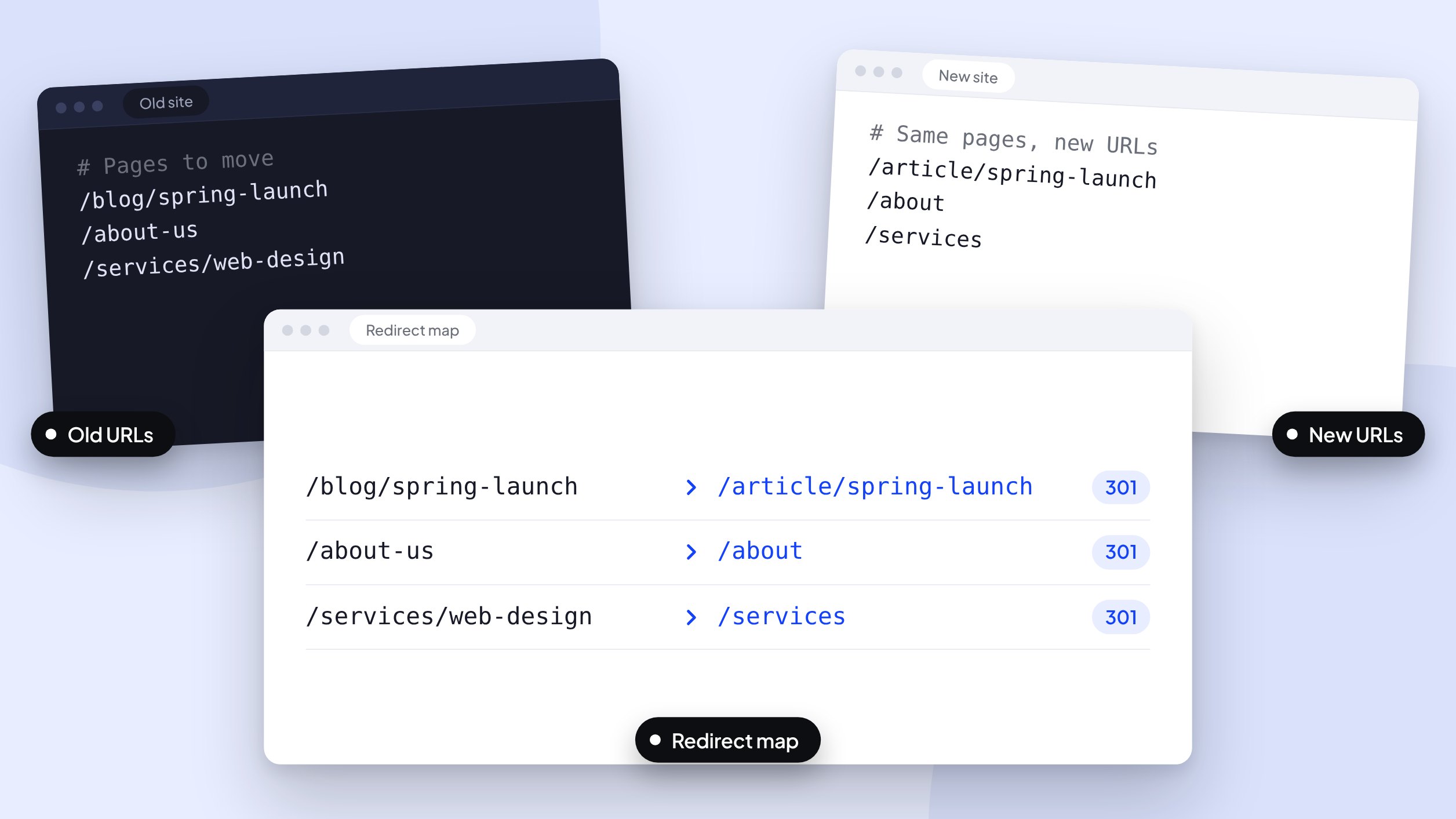
Audit your content and URLs first, map every old URL to its new home with 301 redirects, rebuild with reusable components, then hand off a site your team can run with a handoff guide. The audit and redirect map protect the search visibility you’ve already earned.
Any information contained on this Website is not legal advice and should not be treated as such. You should always contact an attorney for help with your specific legal needs and issues. We may also earn a commission when you click links to our partners and purchase goods or services. For more information, read our Disclaimers Policy.
Your WordPress site got you launched, and now your team’s needs are changing. Time once spent on campaigns goes to maintenance work, layout fixes, and waiting on a developer for routine edits.
If your team spends more time managing the website than using it, it may be ready for a different foundation. Moving to a platform built for stability and scale isn’t just a technical upgrade. It’s how your marketing team gets its speed back.
Signs your team has outgrown its current site
Look for these signals:
- Maintenance work (updates, patches, plugin compatibility) competes with campaign work for time.
- Launches wait on a developer, even for small changes.
- Routine edits risk breaking a layout.
- Ideas that should take hours to launch take days.
The goal of a migration isn’t just a new design. It’s to get speed-to-market back on a stable foundation, so your team can launch campaigns and update content without filing a developer ticket for every change.
Audit your current site before the build
A successful migration starts with an inventory, not a clean slate. You need to know what you have before you build anything new.
1. Inventory your content and SEO equity
Go through your site page by page and decide what needs to move. Identify your high-performing blog posts, core service pages, and critical landing pages. This is also the time to prune outdated content that no longer serves your strategy.
Map your entire URL structure in a spreadsheet. This list becomes the foundation for your 301 redirect map, which sends visitors and search engines to the right pages on the new site. A thorough pre-launch checklist is non-negotiable for preserving your SEO and user experience, and it’s a core part of any proper Webflow build and quality assurance process.
2. Evaluate your tech stack and integrations
Migration is a chance to simplify your stack. List every plugin you use and identify its purpose. Many common needs, such as forms, SEO controls, and sliders, have native Webflow equivalents, so each plugin gets a decision: replace, rebuild, or retire.
For more complex integrations like a CRM or marketing automation tool, the approach shifts from a plugin to a lean script or native integration. It’s also wise to benchmark your current SEO performance with a tool like SearchAtlas, so you have a clear “before” picture of your rankings.
Scaling with a component-based build
Migrating to Webflow is a chance to build your site on a system, not just a collection of pages. That’s the difference between a scalable asset and a site that needs rebuilding the next time your needs change.
Instead of managing shortcodes and nested page-builder blocks, a Webflow site is built with a library of named components. Think of them as pre-approved, reusable sections, like Hero, Feature Grid, or CTA, that your team uses to assemble new pages.
The same logic applies to the CMS. A scalable structure for a blog, team directory, or location pages is planned from the start. With clear naming conventions, the Webflow Editor becomes an intuitive tool for anyone on your team, technical or not.
The handoff: owning your site on day one
A new website is only useful if your team knows how to run it. The final step of the build shouldn’t be a “good luck” email. It should be a structured handoff that gives your team control.
Every build should include a custom handoff guide, as a video or document, showing you exactly how to edit text, update CMS items like blog posts, and change SEO settings. It cuts the back-and-forth emails and gives you full ownership of your new marketing asset.
From there, you have two paths. You can manage the site internally, or you can choose a retainer for ongoing updates and growth work. For fractional marketing teams, a Website Experience Manager can act as an embedded part of your team, owning the site and making sure it evolves with your strategy.
Common questions about Webflow migrations
Will moving to Webflow hurt my SEO?
Not if the migration is handled carefully. A content inventory, a complete 301 redirect map, and pre-launch checks protect the search visibility you’ve built. Skipping them is what puts rankings at risk.
How long does a typical migration take?
It depends on page count, CMS complexity, integrations, and how quickly content gets approved. The pre-build audit is what produces a realistic timeline.
Can I manage my site without a developer?
Yes, for day-to-day content. The site is built in the Webflow Designer, a visual development environment, while your marketing team works in the Webflow Editor. The Editor is a simple interface that lets non-technical users update text, swap images, and add new CMS items without seeing the underlying structure.
Next step
Ready to build a website that accelerates your marketing? Let’s talk about what a migration could look like for you.
