
Any information contained on this Website is not legal advice and should not be treated as such. You should always contact an attorney for help with your specific legal needs and issues. We may also earn a commission when you click links to our partners and purchase goods or services. For more information, read our Disclaimers Policy.
Why Your Knowledge Base is an Untapped SEO Goldmine
Knowledge base and SEO work together to create a powerful, yet underused, marketing asset. Your knowledge base isn't just a support tool—it's a content goldmine waiting to be finded by search engines. When customers search for solutions using queries like "how to," "what is," and "troubleshooting," your knowledge base should provide the answers.
Here's why this matters: 91% of people prefer online knowledge bases that meet their needs, and 81% of consumers favor brands with self-service options. Yet, most businesses treat their knowledge base as an afterthought instead of the SEO powerhouse it can be.
Your support and product teams already know every customer question and product feature. A well-optimized knowledge base captures this expertise, making it findable for existing customers and new prospects. It's a win-win that builds authority, drives traffic, and reduces support costs.
Why is knowledge base and seo a crucial combination?
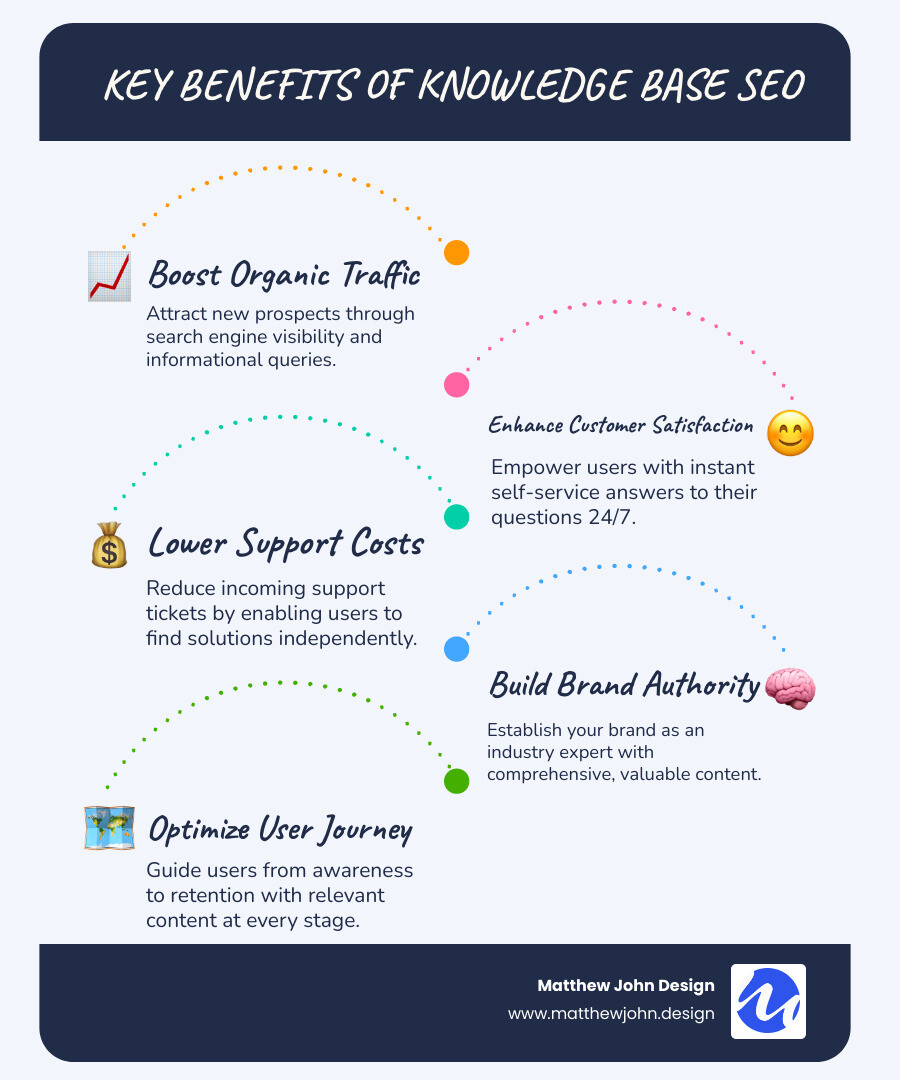
The combination of a knowledge base and SEO is crucial because it aligns with how modern consumers find information.
First, it captures organic search traffic. With 93% of web traffic coming from search engines and nearly 80% of searchers ignoring paid ads, organic visibility is paramount. Your articles can attract prospects actively researching solutions your product provides, making your knowledge base a key tool for customer acquisition.
Second, it supports existing users. A well-optimized knowledge base allows customers to find solutions independently, improving satisfaction and retention. This self-service approach also reduces your support team's workload, freeing them to focus on more complex issues.
Third, it builds topical authority. Consistently providing helpful, accurate information positions your brand as an industry expert, which search engines reward with higher rankings.
Finally, it can earn you prime SERP real estate. Articles answering "how to" questions are ideal candidates for featured snippets, providing immediate visibility and driving qualified traffic directly to your site.
Step 1: Building a Content Strategy That Answers Real User Questions
Successful knowledge base and SEO starts with creating content that solves real user problems. Instead of guessing, listen to what your audience is actually searching for and asking about. Your strategy should include a mix of content types, such as getting started guides, how-to articles, troubleshooting guides, and FAQs.

Each article serves a dual purpose: helping existing customers find solutions and attracting new prospects researching your industry.
Leverage Your Site Search Data to Find Content Gaps
Your site search data reveals exactly what users are looking for. Use Google Analytics to review search term reports, paying close attention to "no results" pages. These searches highlight frustrating content gaps that you need to fill.
Expand your research by analyzing customer support tickets, using social media listening to understand user language, and reviewing user feedback forums. This data helps you identify recurring questions that deserve dedicated articles.
Focus on long-tail keywords—specific, detailed phrases people use when they have a problem. Instead of targeting a broad term like "SEO," create content for "how to optimize knowledge base articles for search engines." These phrases have less competition and higher intent, making them perfect for knowledge base content.
Create Content for Every Stage of the Customer Journey
A strategic knowledge base guides users from prospect to power user. For those researching solutions, create onboarding guides that demonstrate your expertise. For existing users, offer best practice articles and advanced feature tutorials to keep them engaged.
Content creation can be streamlined with tools like AI Tools for SEO Content Creation, which help with outlines and drafts, allowing you to focus on strategy and refinement. The goal is a knowledge base that grows with your users, supporting them at every step.
Step 2: Optimizing Information Architecture and On-Page Elements
With a solid content strategy, the next step is structuring your knowledge base for users and search engines. This involves optimizing your information architecture and on-page SEO elements.
A logical information architecture starts with clear categories like "Getting Started" and "Troubleshooting." Use breadcrumbs (e.g., Home > Getting Started > Account Setup) to show users their location and help search engines understand your site structure. Internal linking is also critical; it connects related articles, keeps users engaged, and distributes page authority. Consider a topic clusters model, with broad pillar pages linking to more specific articles.
Ensure high readability by using clear headings, short paragraphs, and simple language. Tools like Hemingway can help improve clarity. For platform-specific tips, our guide on Webflow Blog SEO offers relevant principles.
Crafting SEO-Friendly Titles, URLs, and Meta Descriptions
Your title, URL, and meta description are what users see in search results. Make them count.
- Titles: Place your primary keyword in title, preferably near the beginning. Focus on clarity, like "How to Add Team Members" instead of "User Management Features."
- Meta Descriptions: Write compelling descriptions under 160 characters that include your keyword and entice users to click.
- URLs: Use short, descriptive URLs like
/reset-password-guidethat are easy to understand. - Headings: Use H1, H2, and H3 headings to create a logical hierarchy that makes content scannable.
- Language: Use user-centric language and get straight to the point.
The Power of Internal Linking and Multimedia
Connecting related articles with internal links creates a natural user flow, reducing bounce rate and helping search engines understand content relationships. This also distributes page authority across your site.
Use multimedia content like screenshots and video tutorials to clarify complex processes. For images, use descriptive file names and alt text for accessibility and SEO. This helps search engines index your visual content.

For video tutorials, Webflow only supports background videos up to 30 MB and lacks native hosting for larger files. Use third-party solutions like YouTube, Vimeo, or Vidzflow for smooth playback. Provide descriptive titles and consider adding transcripts for accessibility and added SEO value.
Step 3: Mastering Technical Knowledge Base and SEO
Strong content needs a solid technical foundation so search engines can find, crawl, and understand it. Mastering the technical side of knowledge base and SEO ensures your content gets the visibility it deserves.

Two fundamentals are non-negotiable: mobile-friendliness and site speed. Your knowledge base must work flawlessly on mobile devices, and pages should load in under three seconds to retain visitors. You can check your site's performance with Google's mobile-friendly testing tool.
Improve Visibility with Sitemaps and Structured Data
To improve visibility, create an XML sitemap that lists all your important pages and submit it to Google Search Console. This helps search engines index your content efficiently.
Next, use structured data markup to give search engines explicit details about your content. FAQPage schema is great for Q&A sections, HowTo schema works for step-by-step guides, and Article schema provides context for general articles. Implementing structured data markup can make your content eligible for rich results like featured snippets.
Use canonical URLs to tell search engines the preferred version of a page when similar content exists, consolidating your ranking signals.
Avoiding Common Pitfalls in Knowledge Base and SEO
Certain technical issues can undermine your SEO efforts. Here’s what to avoid:
- Duplicate content: When the same content appears on multiple URLs, it confuses search engines. Use canonical URLs to designate the primary version.
- Keyword cannibalization: This occurs when multiple pages target the same keywords. The solution is not to de-index your knowledge base—a common mistake that hurts both existing customers and SEO. Instead, refine your keyword targeting to focus knowledge base articles on informational intent and sales pages on commercial intent.
- Thin content and 404 errors: Ensure every article provides genuine value and regularly monitor for broken links that create a poor user experience.
Step 4: Promoting and Maintaining Your Knowledge Base for Long-Term Success
An optimized knowledge base requires consistent promotion and maintenance to achieve long-term success. Treat your knowledge base and SEO efforts like a garden that needs regular care to flourish.
Establish a content refresh schedule to keep articles accurate and valuable. We recommend quarterly audits to update content for new features, reflect interface changes, and remove outdated information. Monitoring performance metrics like time on page and bounce rate will tell you what's working and what needs attention, as strong user engagement can boost rankings.
Don't rely solely on organic findy. Promote articles on social media and in email newsletters to create more pathways to your content. This drives traffic and builds authority. You can integrate this into a broader strategy using ideas from our guide on Content Marketing for SEO: Ideas & Creation Steps.
Ensure Your Content Stays Relevant and Up-to-Date
Outdated information erodes user trust. Maintaining fresh, accurate content is crucial for long-term success.
- Conduct Regular Audits: Review your most popular articles every few months. Look for outdated information, especially after software version updates that change the UI.
- Remove or Update Old Content: Don't let obsolete articles linger. Update them or redirect users to current resources to maintain the quality of your knowledge base.
- Track User Engagement: A high bounce rate on a popular article may indicate that the content isn't meeting user expectations. Improving user satisfaction often leads to better rankings.
- Stay Informed on SEO: The SEO landscape is always changing. Keep up with algorithm updates to ensure your strategy remains effective.
Frequently Asked Questions about Knowledge Base SEO
Here are answers to common questions about knowledge base and SEO optimization.
Should I de-index my knowledge base to avoid keyword cannibalization?
Absolutely not. De-indexing your knowledge base harms existing customers who rely on it for support and cuts off a valuable source of SEO traffic from prospects. It's a self-defeating move.
The correct solution for keyword cannibalization is to refine your keyword strategy. Optimize your main sales pages for commercial keywords (e.g., "best user management software") and focus your knowledge base articles on informational intent (e.g., "how to set up user permissions"). Don't hide helpful content.
What are the best types of keywords for knowledge base articles?
The best keywords are long-tail, informational, and question-based. Focus on phrases that users type when they need help, such as:
- "How to" questions (e.g., "how to reset forgotten password")
- "What is" queries (e.g., "what is single sign-on")
- Troubleshooting phrases (e.g., "login error message won't go away")
These keywords have high intent and less competition than broad terms, giving your articles a better chance to rank and earn featured snippets.
How long does it take to see SEO results from a knowledge base?
While initial impact can appear within weeks, building substantial organic traffic is a long-term effort that can take months or even years. Google may index new articles quickly, but ranking for competitive terms requires patience.
Results depend on factors like content quality, technical health, and your site's domain authority. The key is consistency. Regular updates, ongoing optimization, and promotion will compound over time, turning your knowledge base into a valuable asset.
Conclusion: Transform Your Support Center into a Growth Engine
Your knowledge base is more than a support hub—it's a strategic asset. By combining thoughtful content with smart SEO, your knowledge base and SEO strategy can become a powerful, 24/7 growth engine.
This approach serves multiple goals: attracting new prospects, helping existing customers find answers, reducing your support team's workload, and earning better search engine rankings. A well-optimized knowledge base generates qualified leads, reduces costs, and positions your brand as an industry expert.
At Matthew John Design, we build comprehensive knowledge base and SEO strategies. We design and develop scalable Webflow sites with reusable components and CMS structures, empowering your marketing team to manage content efficiently without developer delays.
Once in place, your knowledge base becomes a compounding asset. Each new article adds value for users and authority for search engines, strengthening your brand and site structure over time.
Ready to turn your support center into a growth engine? Get in touch to discuss your SEO Writing and Video needs and let's open up the full potential of your knowledge base together.
.jpg)